To be honest, this is my first time to setup EKS cluster. I had some experience on self hosted kubernetes, but what I realised, as you can imagine, AWS managed EKS is a different ball game altogether.
I am deploying the whole cluster using terraform, with aws eks module. Using the module is pretty easy and below is the main resource code.
module "eks_cluster" {
  depends_on = [module.s3-bucket]
  source     = "terraform-aws-modules/eks/aws"
  version    = "~> 20.0"

  cluster_name                             = var.name
  cluster_version                          = var.cluster_version
  subnet_ids                               = [var.subnet_az1, var.subnet_az2]
  vpc_id                                   = data.aws_ssm_parameter.vpc_id.value
  tags                                     = merge(local.tags,var.tags, { Service = "EKS" })
  cluster_endpoint_public_access           = true
  cluster_endpoint_private_access          = true
  enable_cluster_creator_admin_permissions = true

  cluster_addons = {
    vpc-cni                = {
      service_account_role_arn = aws_iam_role.vpncni_role.arn
    }
    coredns                = {}
    eks-pod-identity-agent = {}
    kube-proxy             = {}
    aws-efs-csi-driver     = {}
    aws-mountpoint-s3-csi-driver = {
      service_account_role_arn = aws_iam_role.s3_role.arn
    }
  }

  eks_managed_node_group_defaults = {
    instance_types = ["t3.large"]
  }
  eks_managed_node_groups = {
    proxy_apps = {
      # Starting on 1.30, AL2023 is the default AMI type for EKS managed node groups
      ami_type                   = "AL2023_x86_64_STANDARD"
      instance_types             = ["t3.large"]
      # use_custom_launch_template = true
      min_size                   = 2
      max_size                   = 4
      desired_size               = 2
      iam_role_additional_policies = {
        "s3_policy" = aws_iam_policy.s3_policy.arn
      }
      tags = merge(local.tags,var.tags, { Service = "EKS EC2 Worker Nodes" })
      vpc_security_group_ids = [aws_security_group.node_sg.id]
      # remote_access = {
      #   ec2_ssh_key = join("-", ["dsaws", local.name, "pub-key", data.aws_region.current.name])
      # }
    }
  }
}
I did faced couple of issues though which might help you guys, if setting something similar.
Error#1
As you can see, I got this error while setting up EKS managed node group. This error is pretty basic, I can see there is error in pulling the image on EC2 worker node. But than again, I am using all private network behind Hub NAT GW using CloudWAN. So it doesn’t make sense as internet is allowed.
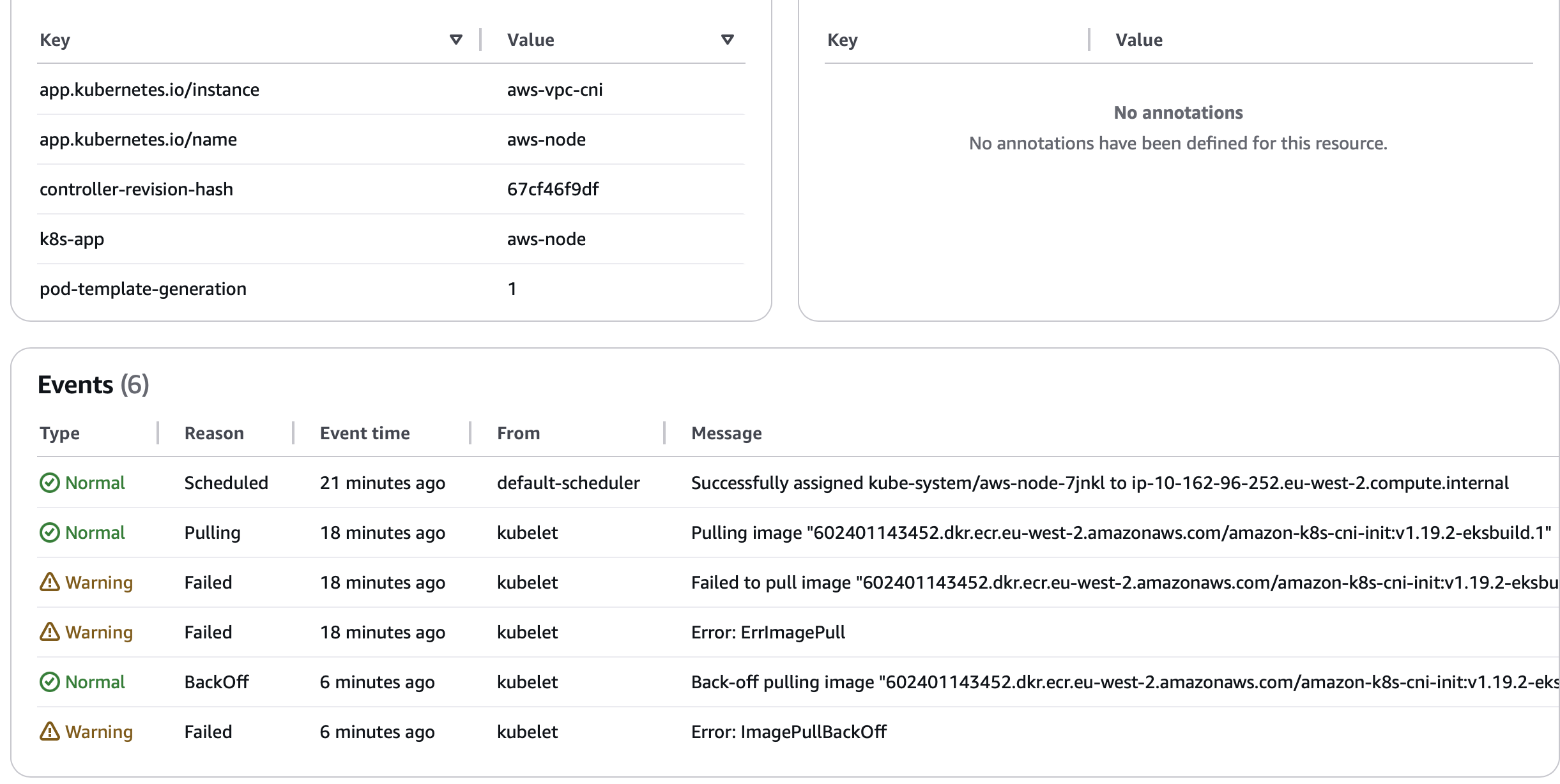
Solution
In order to fix that, first I enabled remote access to my worker nodes and redeployed the config. Below is specific part, which I enabled.
      remote_access = {
        ec2_ssh_key = join("-", ["mykey", local.name, "pub-key", data.aws_region.current.name])
      }
One worker node was redeployed, I was able to ssh in the machine and realised indeed I cannot download any image, although internet access is there. Next I tried to download docker to run some test on pulling images manually. What I realised was any AWS backed repo is inaccessible.
EKS managed worker nodes uses Amazon linux, so their repo is also different, which is S3 backed. Finally, I realised a new S3 endpoint policy rolled out in the VPC which only permits access to S3 traffic from within organization unit and drop everything else. Well that was it, disabling the policy made sure S3 is reachable again, and hence I can reach AWS default repo and registeries, in this case, https://602401143452.dkr.ecr.eu-west-2.amazonaws.com/amazon-k8s-cni-init:v1.19.2-eksbuild.1
Error#2
Second error, which I got was around my Network loadbalancer, created as front end of the application. I had strict requirement that my end devices should be able to communicate to the pod using static IP or FQDN, which is not possible if I only rely on Pod IP. I create network loadbalancer with below config.
apiVersion: v1
kind: Service
metadata:
  name: ds-cfps-nlb
  namespace: chronicle
  annotations:
    service.beta.kubernetes.io/aws-load-balancer-type: "external"
    service.beta.kubernetes.io/aws-load-balancer-nlb-target-type: "ip"
    service.beta.kubernetes.io/aws-load-balancer-scheme: "internal"
    service.beta.kubernetes.io/aws-load-balancer-subnets: "subnet-0377e86c456a7a71c,subnet-0819a2e6f328da824"
spec:
  # allocateLoadBalancerNodePorts: false
  ports:
    - name: syslog
      port: 15514
      targetPort: 15514
      protocol: TCP
    - name: winlog
      port: 14514
      targetPort: 14514
      protocol: TCP
  type: LoadBalancer
  selector:
    app: ds-cfps
Yet somehow, my Loadbalancer was always trying to access Pods via Node port and not Pod IP. Below is background what I was trying to achieve.
IP mode
NLB IP mode is determined based on the service.beta.kubernetes.io/aws-load-balancer-nlb-target-type annotation. If the annotation value is ip, then NLB will be provisioned in IP mode. Here is the manifest snippet:


    metadata:
      name: my-service
      annotations:
        service.beta.kubernetes.io/aws-load-balancer-type: "external"
        service.beta.kubernetes.io/aws-load-balancer-nlb-target-type: "ip"
backwards compatibility

For backwards compatibility, controller still supports the nlb-ip as the type annotation. For example, if you specify


service.beta.kubernetes.io/aws-load-balancer-type: nlb-ip
the controller will provision NLB in IP mode. With this, the service.beta.kubernetes.io/aws-load-balancer-nlb-target-type annotation gets ignored.

Instance mode
Similar to the IP mode, the instance mode is based on the annotation service.beta.kubernetes.io/aws-load-balancer-type value instance
Going back on reading the guidelines again, I realised I missed to deploy AWS Load Balancer Controller. Its written specifically in pre-requisite here,
https://docs.aws.amazon.com/eks/latest/userguide/network-load-balancing.html
I installed the controller and wallah redeployment brought up my loadbalancer listening directly to Pod IP in target group.
https://docs.aws.amazon.com/eks/latest/userguide/lbc-helm.html
Like I say. Pretty straightforward, **Only if you know what you doing 😉*